
Having trouble getting in line, or need to change an appointment outside regular hours? For a non-emergency illness or injury that needs prompt attention, urgent care can be an option. A medical or mental health emergency calls for 911 or the nearest hospital. Knowing which type of care fits can help you choose a next step when the queue is long.
It’s understandable to want a clear plan when your schedule changes or you need care after hours. This guide explains how to schedule, cancel or reschedule your appointments, what triage means for timing, and how to consider after-hours care options in Winnipeg. You’ll find practical guidance for managing appointment changes and deciding what kind of care may suit your needs.
Key Takeaways
- Prepare your key details before booking by phone or online to make the appointment process clearer.
- Understand how triage helps determine care timing, and recognize when symptoms call for emergency help.
- Consider appropriate after-hours care options when your needs can’t wait for a routine appointment.
- If plans change, let the clinic know promptly and have your preferred new appointment time ready.
How do I schedule an appointment?
Choose phone or online booking, then identify the care you need. If your symptoms are urgent, distinguish between a concern that needs prompt attention and an emergency.
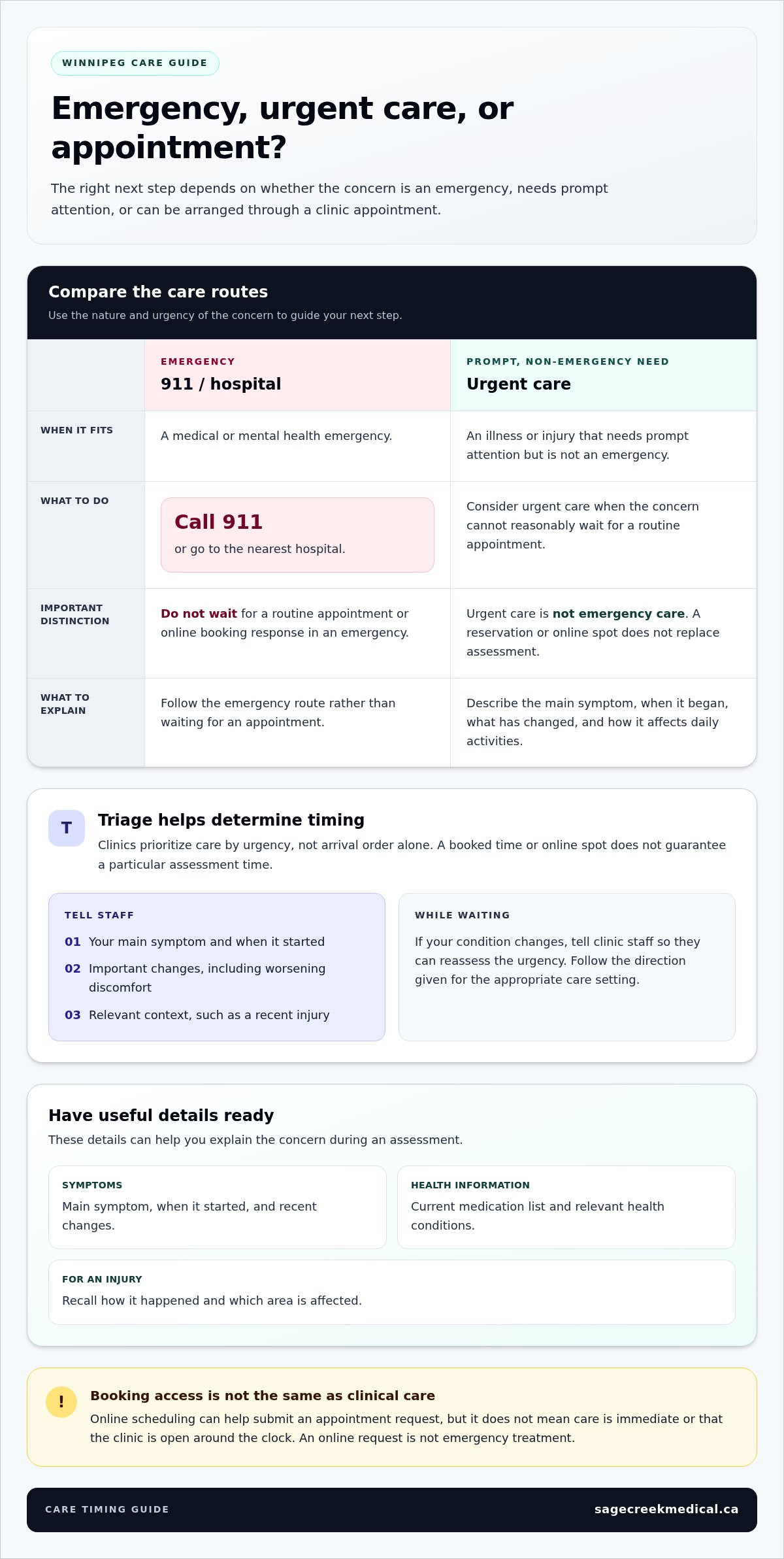
Urgent care is for illnesses or injuries needing prompt attention, not emergencies. A medical or mental health emergency means calling 911 or going to the nearest hospital. For an urgent care spot online, follow the booking page’s steps and describe the concern accurately. A reservation helps organize access, but it does not replace emergency care.
Phone and Online Booking
Use the clinic’s phone or online booking route to request an appointment. Have your name, contact details, reason for the visit and preferred times ready. Explain whether you need help with a new concern or follow-up care. If you’re booking for someone else, have their details available. Review the appointment type and time before submitting your request or ending the call.
Online Scheduling Availability
Online scheduling can make it easier to submit a request without a phone conversation. Open the booking page, choose the appointment option that best matches your need, and review the available times. Online booking does not mean the clinic is open around the clock or that care is immediate. If urgent symptoms are worsening, seek appropriate urgent or emergency care rather than waiting for an online response.
24/7 And Regular Booking Services
Sage Creek Medical Center is in Winnipeg, Manitoba. Scheduling access and in-person clinic hours are separate: booking online does not mean the clinic provides care around the clock. The available details do not establish a 24/7 scheduling service or give clinic hours, so no specific comparison or opening time can be stated. Use the booking route shown by the clinic, and distinguish appointment administration from receiving care.
Triage and appointment timing
Triage helps a clinic prioritize care by urgency, not arrival order alone. Describe your symptoms clearly, including when they began and whether they’re changing. This helps staff understand your concern and direct you to an appropriate care option. Appointment timing can depend on urgency, the type of concern and available care.
Urgent care is for illnesses or injuries that need prompt attention but aren’t medical or mental health emergencies. For example, a nonemergency concern may need assessment and related lab work, an X-ray, or a prescription. These services depend on the clinical need. A booked time or online spot doesn’t replace the clinic’s triage process when you arrive.
- Describe the main symptom and when it started.
- Mention important changes since booking, such as worsening discomfort.
- Explain any relevant context, such as a recent injury.
- Follow the direction given for the appropriate care setting.
Be specific rather than saying only that you feel unwell. “A cough that started yesterday” gives staff more context than “I’m sick.” If your condition changes while waiting, tell clinic staff so they can reassess the urgency. An earlier booking does not guarantee a particular assessment time, since triage considers the needs of everyone seeking care.
A medical or mental health emergency requires a different response: call 911 or go to the nearest hospital. Don’t wait for a routine appointment or an online booking response in an emergency. For nonemergency concerns, review clinic appointment information and describe your needs clearly when arranging care. Clear details support triage and help guide the next step.
After-hours care
Care needs can arise outside regular clinic hours. First, decide whether the situation needs emergency help or prompt, nonemergency assessment. Urgent care is intended for illnesses or injuries requiring prompt attention, not medical or mental health emergencies. The right route depends on your symptoms and how quickly they’re changing.
If symptoms suggest an emergency, call 911 or go to the nearest hospital. Don’t wait for a routine appointment or an online scheduling response. If the concern is nonemergency but cannot reasonably wait, urgent care may be appropriate. Patients can explain when symptoms began, what has changed, and how the issue affects daily activities.
Before seeking care, organize useful information. Note the main symptom, when it started and any recent changes. Gather a current medication list and details about relevant health conditions. For an injury, recall how it happened and which area is affected. These details help you explain the concern during an assessment.
- Choose emergency help for a medical or mental health emergency.
- Consider urgent care for a prompt, nonemergency illness or injury.
- Describe symptom changes when explaining why you need care.
- Keep medication and health details ready for the assessment.
After-hours access to appointment booking and access to in-person clinical care are different. An online request can help with scheduling, but it isn’t emergency treatment. If symptoms worsen while you’re deciding what to do, reassess the urgency rather than relying on the original plan. For a nonemergency concern, a walk-in clinic may be one care option when a scheduled appointment doesn’t fit your timing. Choose based on the nature and urgency of the concern, and use 911 or the nearest hospital for emergencies.
Cancellation and rescheduling notice
If your plans change, contact the clinic promptly by phone or through its online appointment channel to request a cancellation or a different time. Follow the clinic’s response to confirm what happens to your booking.
Notice for Appointment Changes
Send your notice as soon as you know you can’t attend. An early request gives the clinic time to update the appointment and avoids confusion about whether you’re expected. Include the patient’s name, appointment date and time, and the reason for contacting the clinic. For example, explain that your work hours changed and ask about another day.
To request a new time, share the days or periods that work for you. Keep the original appointment details until the clinic confirms a change. A request alone does not mean the booking has been updated. If your health concern changes while arranging a new time, explain what has changed so the clinic can advise you on the next step.
Online and Phone Changes
You can ask to cancel or reschedule through the clinic’s online or phone booking channel. For an online request, enter the appointment details carefully and state whether you want to cancel or find another time. By phone, have the same information ready. Check the clinic’s response for confirmation of the cancellation or the new date and time.
Use a clear sequence: identify the appointment, state the change you’re requesting, provide suitable alternatives, then watch for confirmation. If you’re changing a family member’s appointment, include their name and booking details. Don’t make a second booking to replace the first unless the clinic explains what to do. This helps prevent duplicate appointments and confusion.
To manage a booking or arrange care for a new concern, contact Sage Creek Medical Center through its appointment channel.
Sage Creek Medical Center: Walk-in Clinic Services
Sage Creek Medical Center offers Walk-in Services for assessment and treatment of minor injuries and illnesses. The clinic also provides Primary/Family Medicine, Women’s Health and Chronic Disease Management. These services can help with a new concern or ongoing health needs.
Choose the service that best matches your reason for seeking care. For example, a continuing health concern may fit chronic disease management, while a new, nonemergency issue may call for walk-in care. For an emergency, call 911 or go to the nearest hospital.
Make your next healthcare step feel manageable
A changing schedule or a new health concern can make planning feel complicated. Start by deciding what you need to do next: arrange a visit, change an existing booking, or seek care for a concern that shouldn’t wait. If you need to cancel or reschedule an appointment, or are looking for options when queues are long or it’s after hours, use the appropriate care and booking route for your situation.
Keep your appointment details and a brief description of your concern ready. That simple preparation can make your next conversation clearer and help you explain what support you’re seeking. For questions about care options or arranging an appointment, connect with Sage Creek Medical Center.
Taking one clear step is a good place to begin. You deserve care that feels approachable and suited to your needs.
Frequently Asked Questions
Having trouble getting in line?
If the wait is difficult, consider whether a walk-in visit or another appointment option fits your concern. Sage Creek Medical Center offers same-day walk-in appointments; call 204-813-6474 or use the website booking feature. Have your main symptom and its start date ready to explain. For a medical or mental health emergency, call 911 or go to the nearest hospital instead of waiting for a clinic appointment.
What is your cancellation policy?
Sage Creek Medical Center’s cancellation policy details aren’t included in the available business information. If you can’t attend, contact the clinic promptly with the patient’s name and appointment details, then follow the response about the booking. For example, say whether you want to cancel outright or request a different time. Keep the original appointment information until you receive confirmation of the change.
Is Sage Creek Medical Center open 24/7 for appointment scheduling?
Sage Creek Medical Center’s clinic is not open 24/7. Its hours are Monday to Friday, 7:30 am to 8:00 pm; Saturday, 10:00 am to 5:00 pm; and Sunday, 10:00 am to 3:00 pm. The clinic also has a website booking feature. Booking online and receiving in-person care are different, so use the listed hours when planning a visit.
How can patients book appointments at Sage Creek Medical Center after hours?
Patients can use the website booking feature to submit an appointment request outside the clinic’s listed operating hours. Include the patient’s correct contact information and choose the appointment option that best matches the reason for the visit. For a same-day walk-in appointment, call 204-813-6474 or use the website booking feature. Online booking does not provide emergency care.
What is the Sage Creek Medical Center appointment scheduling phone number?
Call Sage Creek Medical Center at 204-813-6474 about appointment scheduling. Have the patient’s name, preferred contact details, and reason for the visit ready before calling. If you’re calling to change an existing booking, provide its date and time so staff can identify it. For a same-day walk-in appointment, the clinic also lists its website booking feature as an option.
Does 24/7 scheduling connect patients to staff or an automated system?
The clinic’s business information does not describe a 24/7 scheduling system or say whether online requests connect patients with staff or automation. The stated options are the website booking feature and the phone number, 204-813-6474. If you submit a request online, include clear contact details and appointment needs so the clinic can respond through the process it uses.
One Response